This is the multi-page printable view of this section.
Click here to print.
Return to the regular view of this page.
Idra
Idra is Open Source Change Data Capture that could run in cluster mode.
It is based on Apache License 2.0
A permissive license whose main conditions require preservation of copyright and license notices. Contributors provide an express grant of patent rights. Licensed works, modifications, and larger works may be distributed under different terms and without source code.
1 - Change Data Capture
What is a Change Data capture
This is an introduction to Change Data Capture
What is it?
Change Data Capture (CDC) is a set of techniques or tools used to identify and capture changes made to data in a database or data source. This is often used in data integration, data warehousing, and real-time analytics to ensure that changes in the source system are reflected in the target system or application.
How works?
-
Monitoring: CDC involves monitoring the data source for changes. This can be done in various ways depending on the database system and the CDC method used.
-
Capture: Once changes are detected, CDC captures these changes. This can include new records, updates to existing records, and deletions.
-
Transformation: Sometimes, captured changes need to be transformed or formatted to match the requirements of the target system.
-
Loading: The transformed changes are then loaded into the target system, which could be another database, a data warehouse, or an analytics platform.
-
Application: The target system applies these changes to keep its data synchronized with the source.
Benefits
Real-Time Data Synchronization: Keeps the target systems up-to-date with minimal delay, which is critical for real-time analytics and decision-making.
Efficient Data Integration: Reduces the need for full data extracts and transfers, which can be resource-intensive.
Improved Data Accuracy: Ensures that changes are consistently and accurately reflected across systems.
Reduced Latency: Helps in minimizing the lag between when a change occurs and when it is reflected in the target system.
Use Cases
-
Data Warehousing: To keep the data warehouse synchronized with operational databases.
-
Real-Time Analytics: To ensure analytics platforms reflect the latest data.
-
ETL Processes: For efficient Extract, Transform, Load (ETL) processes by capturing only changed data.
-
Data Replication: To replicate changes from one database to another.
-
Microservices: CDC is well known patern in Microservices Oriented Architectures
-
Getting Started: Get started with Idra
2 - Getting Started
What does your user need to know to try your project?
Local Setup
Prerequisites
To run Idra with scaling support, you need to have ETCD up and running. Therefore, the first step is to install ETCD. If you prefer to run Idra without ETCD, you can do so in “Static” mode by using a JSON file that contains your sync definitions. In this case, all computations will run in batch mode, without concurrency enabled.
Setup ETCD
Run CDC and Web REST API
Run main.go in cdc_agent folder using “go run main.go”
Run main.go in web folder using “go run main.go”
Docker
Every application contains a Docker file that permits to build and run the application without to install any Golang environment.
Kubernetes
It is possible to deploy applications using Helm charts in Kubernetes. Idra is written and inspired by a Cloud Native Approach. All charts and Helm files are ready to be used.
3 - Some Concepts
Concepts about CDC and Idra
Data Integration
Idra allows the integration of applications, data, sensors, and messaging platforms using connectors that enable interaction with all the data sources we want. The solution is based on the concept of a connector, which is nothing more than a pluggable library (implementing a specific interface) in Golang.
Monitoring
Monitoring is done using a dedicated web application that allows you to see the connectors that are running and to conveniently define new ones using a user-friendly interface.
Architecture
The architecture of Idra is based on a series of workers responsible for executing various synchronization processes.
Alternatively, Idra can also be run in single-worker mode.
Additionally, it’s possible to run it without relying on a supporting database simply by using a configuration file.
Conceptually, it moves data from a source to a destination. The source can be a sensor exposing data, a Cloud API, a database, a message middleware such as Apache Kafka, any Storage (currently supporting S3), while the destination can be another system of the same type (database, message middleware, sensor, API, etc.).
4 - Setup
Instructions
Docker
See deploy script
docker build -t agent-cdc -f ./cdc_agent/Dockerfile .
docker build -t web-cdc .
docker run -p 8080:8080/tcp web-cdc
- Command to deploy etcd in kubernetes
helm install my-release bitnami/etcd –set auth.rbac.create=false
To connect to your etcd server from outside the cluster execute the following commands:
kubectl port-forward --namespace default svc/my-release-etcd 2379:2379 &
echo "etcd URL: http://127.0.0.1:2379"
helm upgrade web-cdc chart-web-cdc
./bin/etcd
Use Leases to monitor cluster nodes
In case a node is added or removed we elect a leader that will manage rebalance process assigning
syncs to cluster nodes
go run main.go
Environment Variables
This environment variable is used to run agent in static mode using a JSON file or run it using ETCD
Contains value for ETCD database server url
Contains value for domain to assign to GinSwager to expose Rest API using Kubernetes deployment
Code setup env vars
var urlPath = os.Getenv("DOMAIN")
var url func(config *ginSwagger.Config)
if urlPath == "" {
	url = ginSwagger.URL("http://0.0.0.0:8080/swagger/doc.json")
} else {
	url = ginSwagger.URL(urlPath + "/swagger/doc.json")
}
5 - Connectors
Data Connectors
A connector is a reference to a data source or destination used by Idra to trasfer data from a source to a destination. Idra supports multiple connector types that we describe here.
We have some DBMS based connectors and some other. Every connector is based on an interface. So eventually to add a new connector we need to implement just this interface.
GORM Postgres
Postgres connector based on GORM.
Connection String sample:
host=localhost user=gorm password=gorm dbname=gorm port=9920 sslmode=disable TimeZone=Asia/Shanghai
GORM Mysql
Mysql connector based on GORM
Connection String Sample:
user:pass@tcp(127.0.0.1:3306)/dbname?charset=utf8mb4&parseTime=True&loc=Local
GORM SQL Server
SQL Server connector based on GORM
Connection String Sample:
sqlserver://gorm:LoremIpsum86@localhost:9930?database=gorm
SQLite GORM
SQLite connector based on GORM
RabbitMQ AMQP Connector
This connector permits to manage RabbitMQ AMQP stardard protocol.
Default port is 5672.
This is a sample of connector:
[
{
“id”: “b3016da2-594e-3e4a-a65c-5ab679f9124f”,
“sync_name”: “Sample RabbitMQ”,
“source_connector”: {
“id”: “id”,
“connector_name”: “sample”,
“connector_source_type”: “RabbitMQConnector”,
“connection_string”: “amqp://guest:guest@localhost:5672/”,
“query”: “”,
“table”: “hello-go”,
“polling_time”: 0,
“timestamp_field”: “last_update”,
“max_record_batch_size”: 5000,
“timestamp_field_format”: “”,
“save_mode”: “”,
“attributes”: {
“username”: “guest”,
“password”: “guest”,
“host”: “127.0.0.1”
}
},
“destination_connector”: {
“id”: “id”,
“connector_name”: “sample2”,
“connector_source_type”: “RabbitMQConnector”,
“connection_string”:“amqp://guest:guest@localhost:5672/”,
“query”: “”,
“table”: “sample”,
“polling_time”: 0,
“timestamp_field”: “”,
“timestamp_field_format”: “”,
“save_mode”: “Insert”,
“attributes”: {
“username”: “guest”,
“password”: “guest”,
“host”: “127.0.0.1”
}
},
“mode”: “Last”
}
]
RabbitMQ Streaming Connector
This connector permits to manage RabbitMQ Streaming technology. Here more info:
https://www.rabbitmq.com/docs/streams
It is possible also to control offset. Our connector is written using this library:
https://github.com/rabbitmq/rabbitmq-stream-go-client
Default port is 5552.
This is a sample of connector:
[
{
“id”: “d7643ea-8745-3e4a-a65c-5e4379f9124f”,
“sync_name”: “Sample RabbitMQ Streaming”,
“source_connector”: {
“id”: “id”,
“connector_name”: “sample”,
“connector_source_type”: “RabbitMQStreamConnector”,
“connection_string”: “”,
“query”: “”,
“table”: “hello-go-stream”,
“polling_time”: 0,
“timestamp_field”: “last_update”,
“max_record_batch_size”: 5000,
“timestamp_field_format”: “”,
“save_mode”: ""
},
“destination_connector”: {
“id”: “id”,
“connector_name”: “sample2”,
“connector_source_type”: “RabbitMQStreamConnector”,
“connection_string”:"",
“query”: “”,
“table”: “sample_stream”,
“polling_time”: 0,
“timestamp_field”: “”,
“timestamp_field_format”: “”,
“save_mode”: “Insert”
},
“mode”: “Next”,
“attributes”: {
“username”: “guest”,
“password”: “guest”,
“host”: “127.0.0.1”
}
}
]
REST Connector
REST Connector that uses GET request for read data and POST to push data.
URL Sample: https://jsonplaceholder.typicode.com/posts
S3 JSON Connector
Connector that send data to AWS S3 Bucket using JSON format
os.Getenv("AWS_ACCESS_KEY"), os.Getenv("AWS_SECRET")
...
manager2 := data2.S3JsonConnector{}
manager2.ConnectionString = "eu-west-1"
manager2.SaveData("eu-west-1", "samplengt1", rows, "Account_Charges")
MongoDB
MongoDB connector based on Mongo Stream technology
Connection String sample:
“mongodb+srv://username:password@cluster1.rl9dgsm.mongodb.net/?retryWrites=true&w=majority&appName=Cluster1”
Kafka (Under development)
Kafka connector
Connection String sample:
ConnectionString=“127.0.0.1:9092”
Attributes:
Username=“kafkauser”
Password=“kafkapassword”
ConsumerGroup=“consumer_group_id”
ClientName=“myapp”
Offset=“0”
Acks=“0|1|-1”
Immudb
Connection String sample:
ConnectionString=“127.0.0.1”
Attributes:
username=user
password=password
database=mydb"
ChromaDB (Under development, Insert Only)
Connection String sample:
http://localhost:8000
Table = “products”
IdField = “id”
6 - How Work
How works a sync
A sync is an entity that describes all informations that Idra needs to process data from a source to a destination.
A typical record that describe a sync has this form:
{"id":"28955df5-3f4a-48f5-b60e-cf898d01cbe6","sync_name":"Sincro_postgres_mysql",
"source_connector":
    {"id":"id","connector_name":"con1","connector_source_type":"PostgresGORM","connection_string":"host=localhost user=postgres password=postgres dbname=school port=5432 sslmode=disable TimeZone=Europe/Rome","database":"","query":"","table":"bimbi","polling_time":60,"timestamp_field":"ts","timestamp_field_format":"","max_record_batch_size":50000,"save_mode":"Insert","start_offset":0,"token":""},
"destination_connector":
    {"id":"id","connector_name":"con2","connector_source_type":"MysqlGORM","connection_string":"root:cacata12@tcp(127.0.0.1:3306)/school?charset=utf8mb4\u0026parseTime=True\u0026loc=Local","database":"school","query":"","table":"bimbi","polling_time":60,"timestamp_field":"ts","timestamp_field_format":"","max_record_batch_size":50000,"save_mode":"Insert","start_offset":0,"token":""},
"mode":"LastDestinationTimestamp","disabled":false}
Save Mode (mode parameter):
This parameter describes the strategy used to update data on destination.
FullWithId
This mode uses an identifier key to track the last record inserted. It employs an insert-only approach, meaning it does not update existing records but adds new ones sequentially. The offset, which is the last used ID, is stored in the Idra database to ensure that new records are inserted correctly and in order.
LastDestinationId
This strategy checks the last registered ID in the destination system, retrieves it, and transfers all new records to the data source. No separate offset needs to be maintained in the Idra database, as the most recent ID is directly consulted to determine which records need to be transferred. This approach is useful for ensuring data completeness without manually managing offset information.
LastDestinationTimestamp
This strategy is similar to LastDestinationId but uses a timestamp field to identify recent records. In this case, you can choose between an insert strategy or a merge strategy. Utilizing a timestamp allows for more flexible data management by synchronizing records based on their creation or update time.
Timestamp
This mode is similar to FullWithId but uses a timestamp field to track records. As with the previous strategy, you can choose whether to use an append strategy or a merge strategy. Using a timestamp provides finer control over inserted and updated records, making it easier to manage changes over time.
A connector, on the other hand, is a data reference. For more details, please refer to the dedicated page in the documentation.
7 - Components
Components in Idra
7.1 - Agents
An agent is simply a running instance of Idra.
Idra is designed to run in cluster mode, which enhances its ability to scale effectively. In this mode, all agents within the system connect to a shared ETCD instance. ETCD serves as a distributed key-value store that helps manage configuration data and state across multiple instances of the application.
By having all agents share the same ETCD instance, Idra ensures that they can communicate and coordinate their activities seamlessly. This shared architecture allows the system to scale horizontally, meaning that you can add more agents to handle increased loads without sacrificing performance.
Moreover, using a centralized ETCD instance is crucial for implementing locks that prevent concurrent processing on the same data sources. When multiple agents attempt to access the same resource simultaneously, it can lead to data inconsistencies and processing errors. The locking mechanism provided by ETCD ensures that only one agent can process a given data source at any time. This prevents conflicts and guarantees that the integrity of the data is maintained throughout the processing cycle. Overall, this architecture not only enhances scalability but also improves the reliability and efficiency of data handling within the system.
7.2 - Assignments
Assignment
An assignment is an association between a sync and an agent that is processsing that sync.

How syncs are processed
In a cluster of agents with more than one member, synchronization work is balanced among all elements within the cluster. Each synchronization task is handled by a single agent at a time. If an agent is added to the cluster or if an agent crashes, a rebalancing process is triggered, redistributing all assigned synchronization tasks.
When an agent crashes, the synchronization tasks assigned to the failed agent are reassigned to other agents within the cluster. This mechanism is somewhat similar to Kafka’s rebalancing process, which relies on Zookeeper. Also it is similar to shard management in some databases.

7.3 - Data Sources
Data Sources
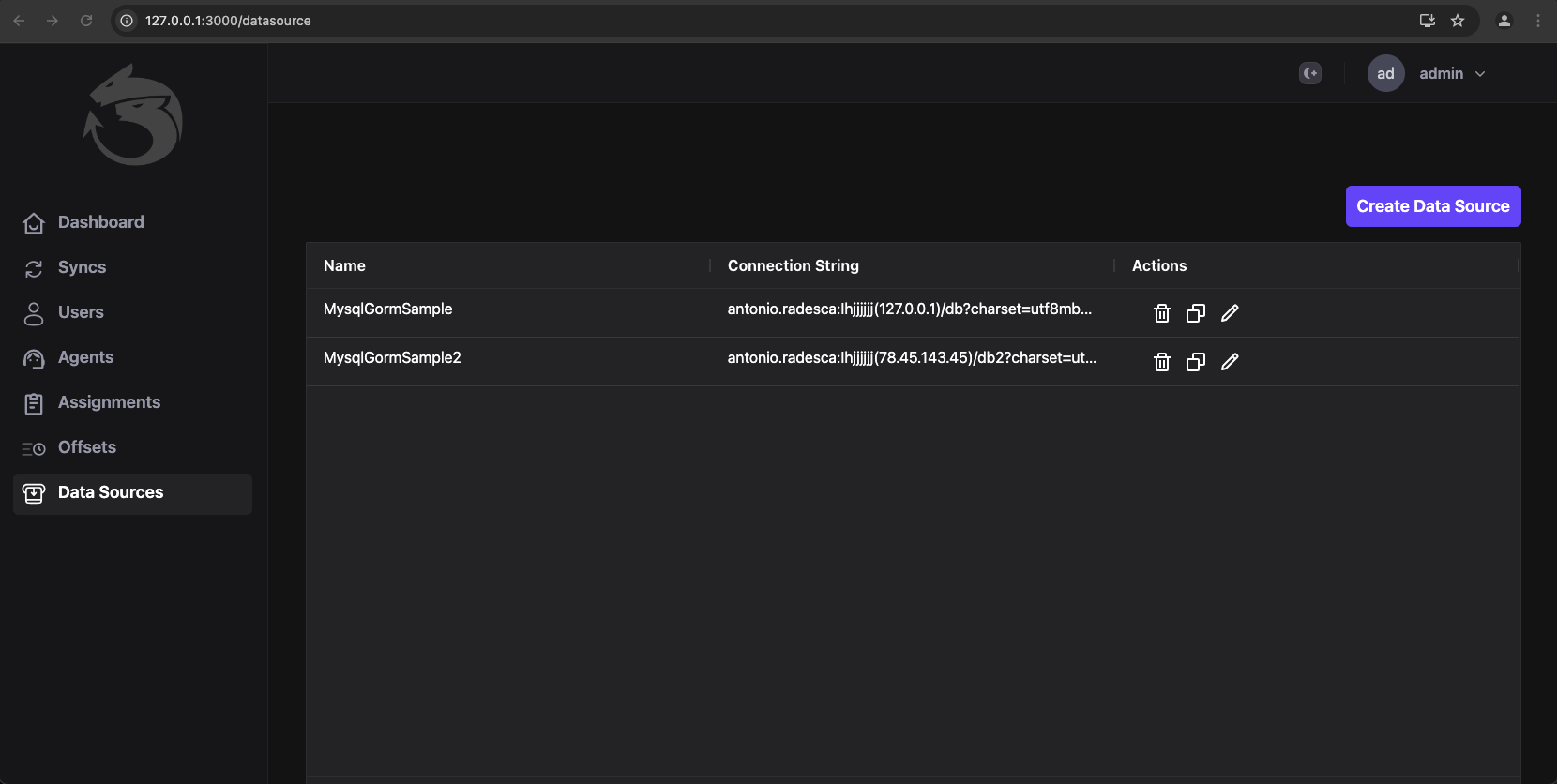
A data source is a placehgolder for data about a connection to some data. It is used in UI for mantain a copy of the most used data source connections.
Data Sources Management
Data sources could be managed via UI.

7.4 - Offset
In Idra, an offset serves as a crucial mechanism for tracking the last identifier processed during synchronization. This offset plays a vital role in ensuring that the system accurately monitors which data has been successfully processed, thus preventing duplicate or missed entries. In many synchronization strategies, this offset is stored in ETCD, a distributed key-value store that helps maintain information about the most recently processed identifier. Typically, this identifier can be represented as either an integer or a timestamp, depending on the specific use case and the nature of the data being handled.
Given the importance of the offset in managing data integrity and synchronization, it is essential to ensure that ETCD is as durable as possible. Durability refers to the ability of the system to preserve data even in the face of failures, such as server crashes or network issues. Running ETCD in cluster mode is considered the best option for achieving this level of durability. In cluster mode, multiple ETCD nodes work together to replicate data, providing redundancy and increasing the likelihood that the stored offsets remain safe and accessible.
Moreover, the user interface of Idra does allow for the manual adjustment of the offset. However, this feature should be approached with extreme caution. Changing the offset manually can lead to significant issues, such as data inconsistencies or unintended reprocessing of messages. Therefore, it is crucial to fully understand the implications of any changes made to the offset before proceeding. Ensuring that you have a clear plan and thorough understanding of the data flow is vital for maintaining the integrity and reliability of the synchronization process.
In summary, the use of offsets in Idra is essential for effective synchronization and data management. Proper handling of these offsets, especially in conjunction with a robust ETCD configuration, is key to ensuring the system’s reliability and performance.
More info about clustering in ETCD here:
https://etcd.io/docs/v3.4/op-guide/clustering/
7.5 - ETCD
ETCD plays an important role in the application. ETCD is a highly reliable distributed key-value database designed to be used as a coordination data store for distributed applications.
Here are some of its key features:
Distributed architecture:
ETCD is designed to operate in a distributed environment and to be able to scale horizontally. It can run on a cluster of machines working together to provide a reliable service.
Distributed consensus:
ETCD uses a distributed consensus algorithm to ensure that all machines within the cluster have a consistent copy of the data. This distributed consensus algorithm is called Raft.
RESTful API:
ETCD provides a RESTful API that allows applications to access the data stored in it easily and conveniently. ETCD’s RESTful API is designed to be simple and intuitive to use.
Data consistency:
ETCD ensures that data is always consistent and correct. This means that all changes made to the data are quickly and reliably propagated to all machines within the cluster.
Security:
ETCD provides a range of security mechanisms to protect the data. This includes authentication and authorization, encryption, and key management.
Open source:
ETCD is an open-source project that is available for free use and modification. This means that developers can contribute to the code and improve it to meet their specific needs.
ETCD is used in this application to ensure that one and only one agent performs data synchronization. It allows for the election of a leader who is responsible for rebalancing the work of the agents when a new agent is added and is no longer available (due to deletion or crash), and when something is changed at the sync level such as the addition or removal of a sync.
The agent is written in Golang to simplify the process of managing the code that handles concurrency. In fact, it makes heavy use of Goroutines, which simplify the writing and management of concurrency.
Code can also use syntax highlighting.
func main() {
  input := `var foo = "bar";`

  lexer := lexers.Get("javascript")
  iterator, _ := lexer.Tokenise(nil, input)
  style := styles.Get("github")
  formatter := html.New(html.WithLineNumbers())

  var buff bytes.Buffer
  formatter.Format(&buff, style, iterator)

  fmt.Println(buff.String())
}
7.6 - API Server
Data Management Rest API Server
The Web server allows access to all synchronization information present in ETCD via API.
The API server is written in Golang using the Gin framework, and this server is used by the Web client UI. GIN is a lightweight and fast web framework written in Go that enables the creation of scalable and high-performance web applications. Here are some of its key features:
Routing:
GIN offers a flexible and easy-to-use routing system, allowing for efficient handling of HTTP requests. You can define routes, manage route parameters, use middleware to filter requests, and more.
Middleware:
GIN supports the use of middleware to modularly handle HTTP requests. There are many middleware available, including logging middleware, error handling middleware, security middleware, and more.
Binding:
GIN offers a binding system that automatically binds HTTP request data to your application’s data types. You can easily handle form data, JSON data, XML data, and more.
Rendering:
GIN provides a flexible and easy-to-use rendering system, allowing for easy generation of HTML, JSON, XML, and other formats.
Testing:
GIN provides a great testing experience, with features such as integration test support and the ability to easily and intuitively test HTTP calls.
Performance:
GIN is known for its high performance and ability to easily handle high-intensity workloads. You can use GIN to create high-performance web applications, even in high concurrency environments.
In summary, GIN is an extremely useful web framework for creating web applications in Go. Thanks to its flexibility, high performance, and wide range of features.
7.7 - Web UI
About Web (Web UI is not an open source extension).
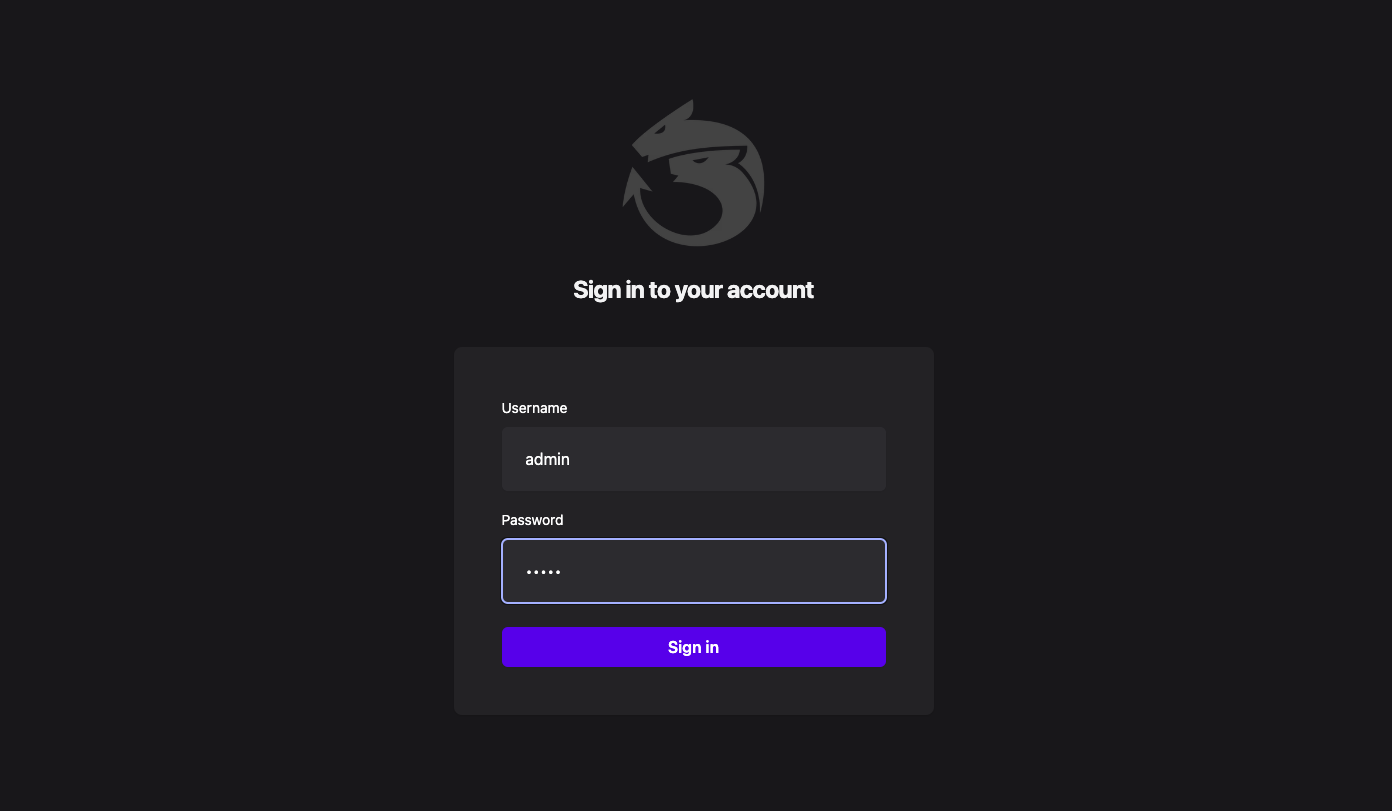
Login
Default credentials to login in the Web UI, are admin/admin. Idra Web UI is a custom component not Open Source.
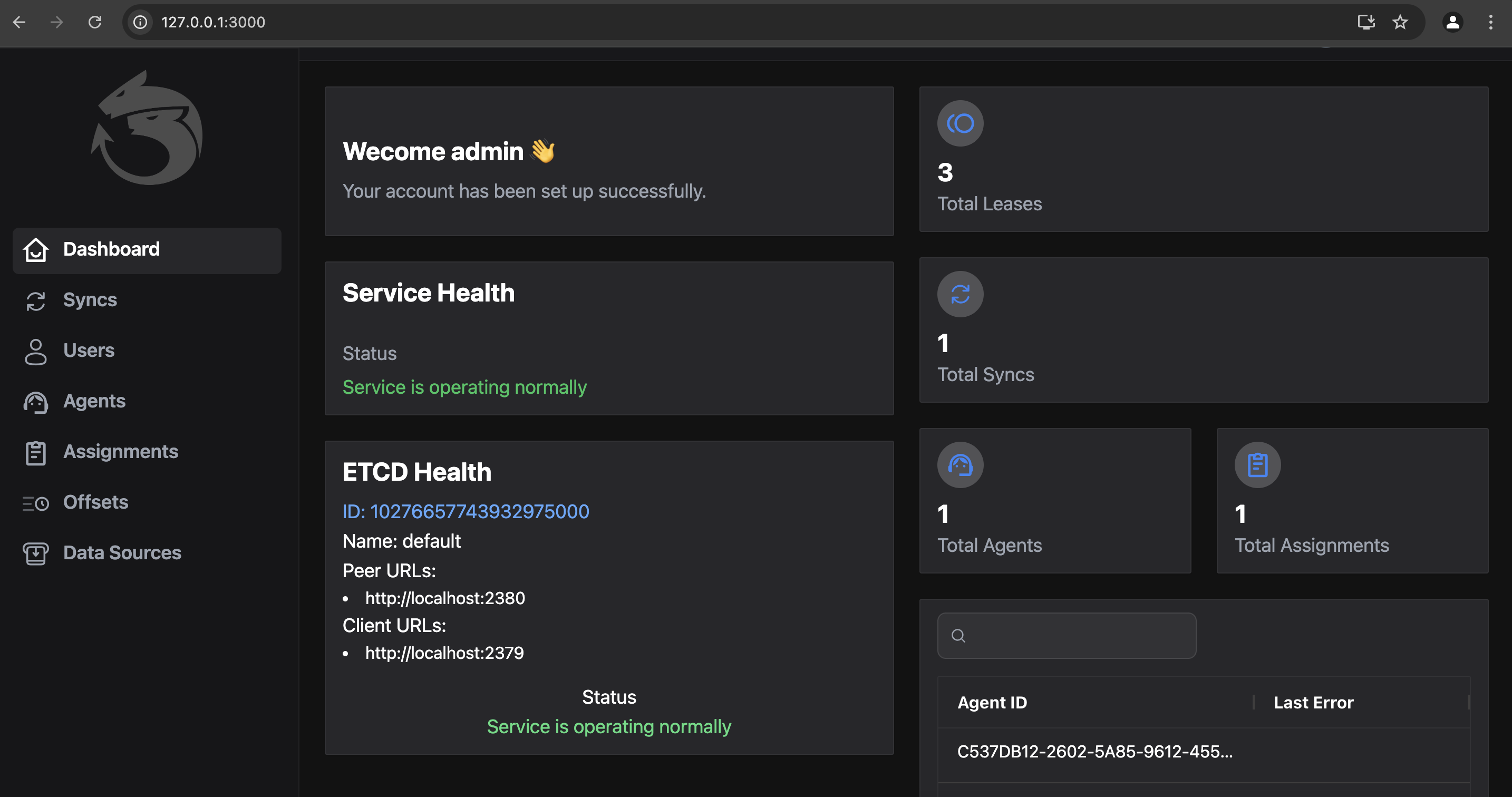
Dashboard
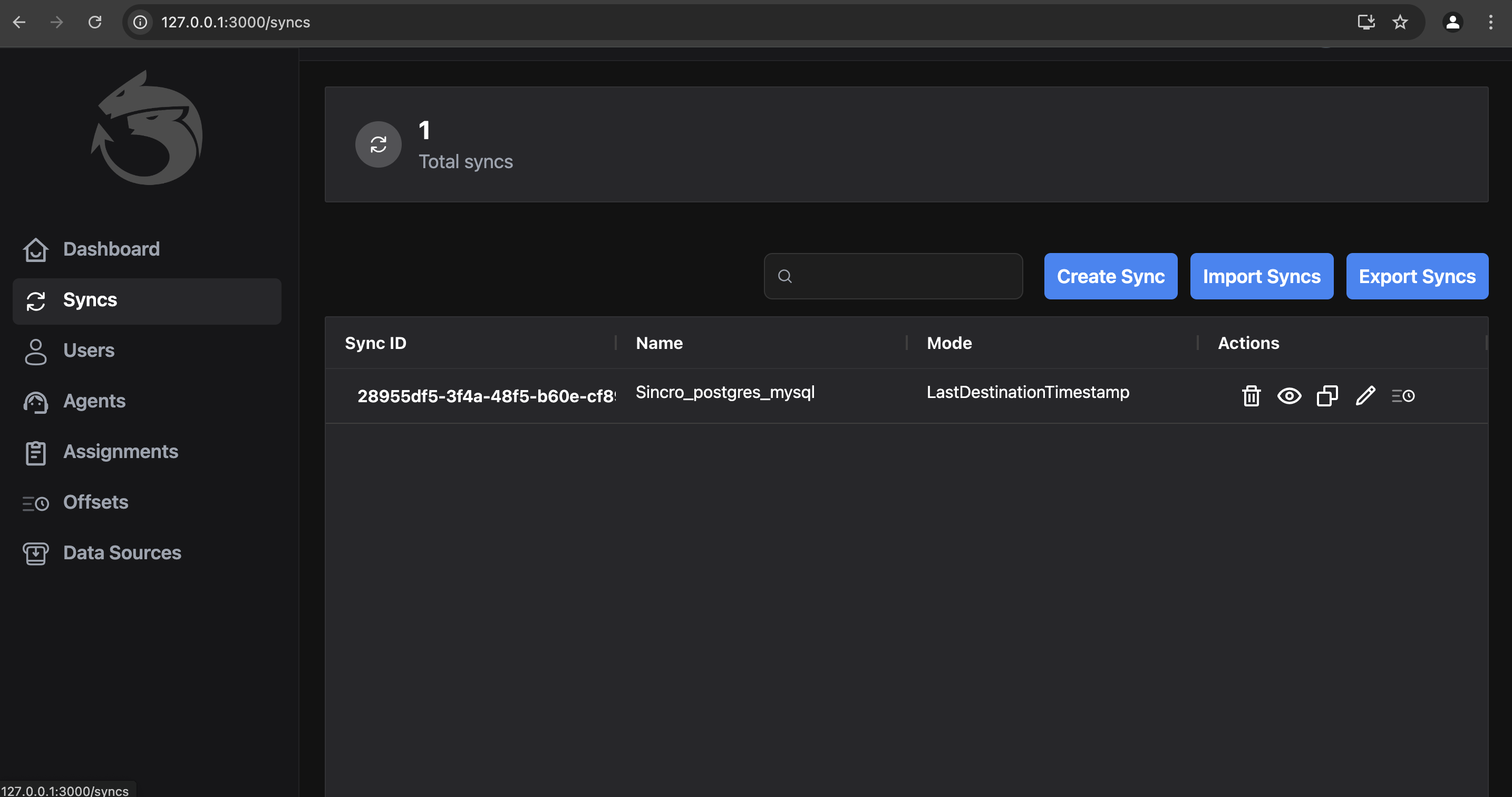
Sync: List of Syncs
Sync: Edit a sync
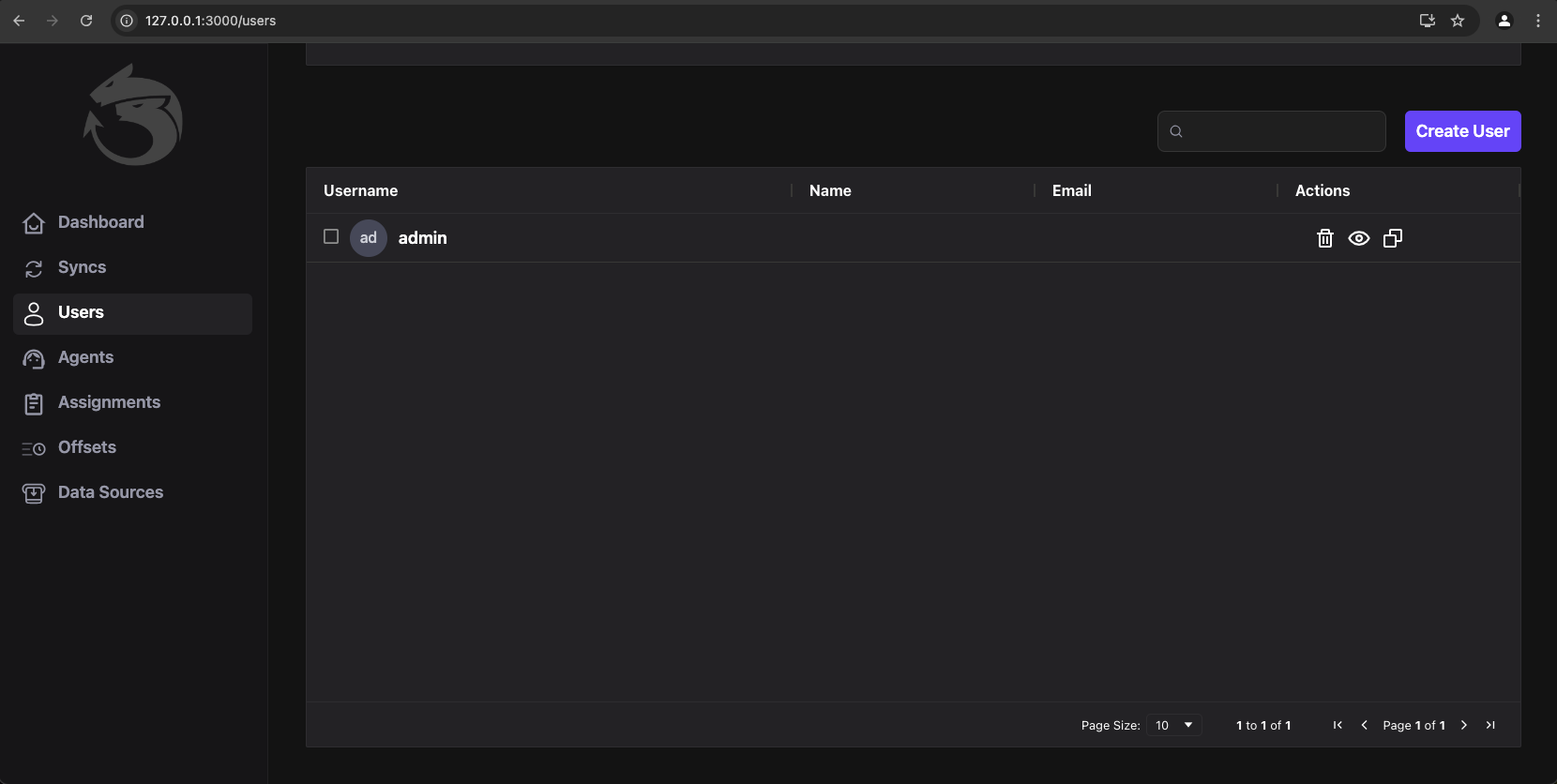
Users: Users Management View
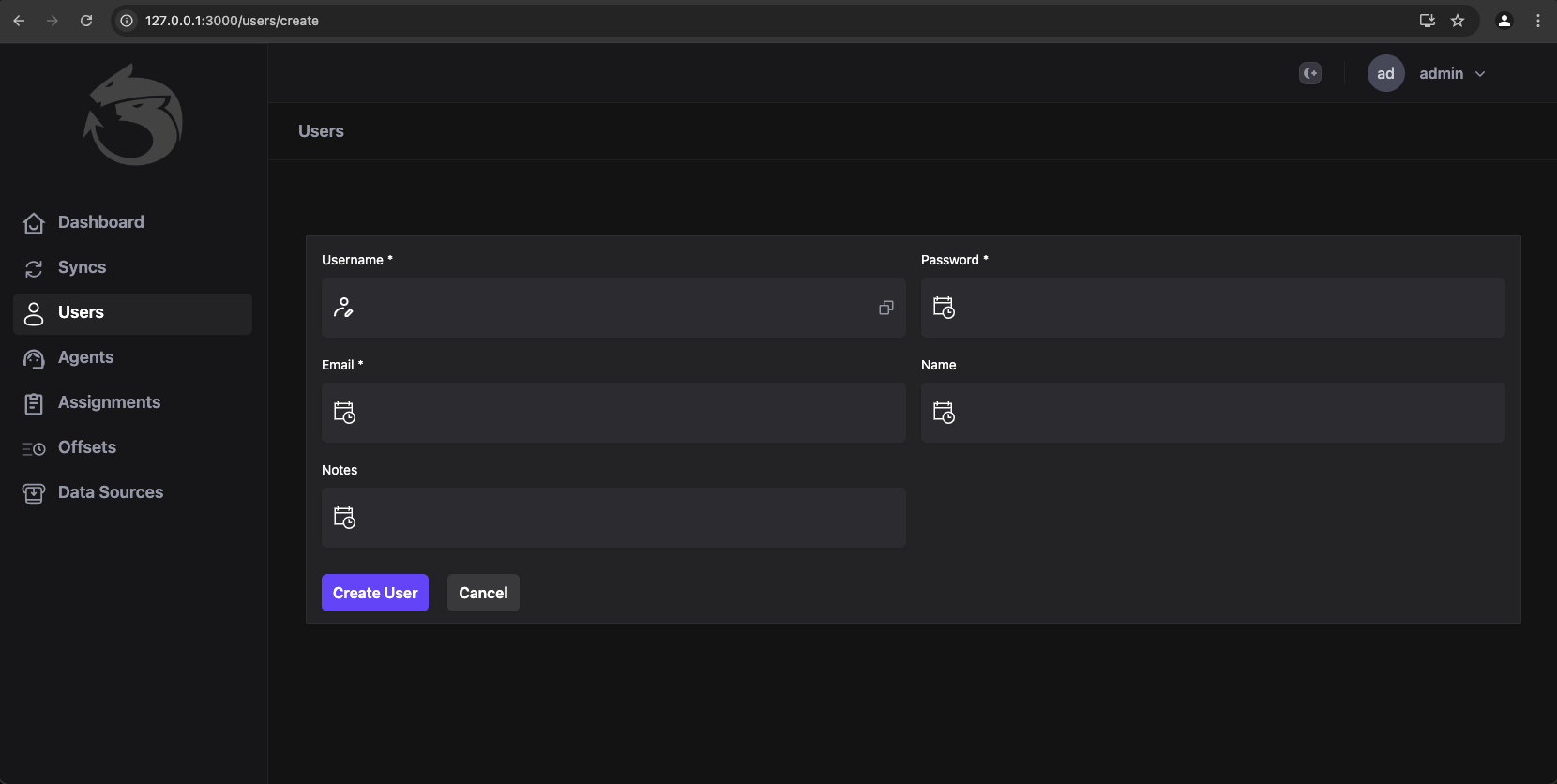
Users: Create a new user for login
7.8 - Workers, Jargon and Distributed Locks
A short description about some concepts that are part of Idra.
Worker
Each worker node is responsible for processing one or more syncs. A sync is an object that contains a source connector, from which data is retrieved, and a destination connector, where the data is written.
In its simplest configuration, a worker can use a JSON file and be launched without the support of ETCD in single mode. Idra can also be launched in cluster mode (multiple instances are run to increase computing capacity).
The supported connectors at the moment are:
Postgresql
Mysql-Mariadb
Sqlite
Microsoft SQL Server
MongoDB
Apache Kafka
Amazon S3
Custom API
Here are some concepts present in Idra:
Sync: Data synchronization process consisting of a source and a destination
Connector: Source or destination provider that connects to a database, sensor, middleware, etc.
Agent: Instance of Idra responsible for executing syncs and connectors
ETCD: Distributed database based on the key-value paradigm.
Each worker, besides being responsible for processing synchronizations, also implements specific algorithms for distributed concurrency. By using leader election,
the system implements the ability to distribute the load and redistribute computation if a worker fails or a new worker is started.
The leader election algorithm, or distributed consensus algorithm, is a mechanism used by distributed systems to select a node within the system to act as a leader.
Distributed Lock
Each synchronization process is guaranteed to process a single synchronization process and uses a distributed lock to achieve this result. A distributed lock is a mechanism used in distributed systems to coordinate concurrent access to shared resources by multiple nodes. Essentially, a distributed lock functions as a global semaphore that ensures only one entity at a time can access a particular resource.
The idea behind the distributed lock is to use a distributed coordination system, in this case, we use ETCD, to allow nodes to compete for control of the shared resource. This coordination system can be implemented using a variety of techniques, including election algorithms, communication protocols, and other mechanisms.
When a node requests control of a resource, it sends a request to acquire the distributed lock to the distributed coordination system. If the lock is available, the node acquires the lock and can access the shared resource. If the lock is not available, the node waits until it becomes available.
It is important to note that a distributed lock can be implemented in different modes. For example, a distributed lock can be exclusive, meaning that only one node at a time can acquire it, or it can be shared, meaning that multiple nodes can acquire it simultaneously. The choice of the type of distributed lock depends on the specific requirements of the distributed system in which it is used.
8 - Tutorials
Show your user how to work through some end to end examples.
This is a placeholder page that shows you how to use this template site.
Tutorials are complete worked examples made up of multiple tasks that guide the user through a relatively simple but realistic scenario: building an application that uses some of your project’s features, for example. If you have already created some Examples for your project you can base Tutorials on them. This section is optional. However, remember that although you may not need this section at first, having tutorials can be useful to help your users engage with your example code, especially if there are aspects that need more explanation than you can easily provide in code comments.
8.1 - Run Code
Tutorial to run code
Install etcd
https://etcd.io/docs/v3.5/install/
Run Code
go get .
In folder cdc_agent there is main where you can decide if use ETCD for manage scalable configuration. If you need something simple you can simply pass a json filte with connectors.
func main() {
	err := godotenv.Load("../cdc_agent/.env")
	if err != nil {
		fmt.Println("Error loading .env file")
	}
	if custom_errors.IsStaticRunMode() {
		processing.ProcessStatic()
	}else{
		processing.StartWorkerNode()
	}
}
...
func IsStaticRunMode() bool {
	value := os.Getenv(models.Static)
	return value == "true"
}
...
unc ProcessStatic() {
	var syncs []cdc_shared.Sync
	path, err := os.Getwd()
	custom_errors.LogAndDie(err)
	staticFilePath := os.Getenv(models.StaticFilePath)
	dat, err2 := os.ReadFile(staticFilePath)
	custom_errors.LogAndDie(err2)

	json.Unmarshal(dat, &syncs)
	for {
		for _, sync := range syncs {
			fmt.Println(sync.SyncName)
			data.SyncData(sync, sync.Mode)
		}
		time.Sleep(1 * 3600 * time.Second)
	}
}
8.2 - Tutorial: Setup a data connector
The Idra platform enables data synchronization from various sources such as DBs, APIs, sensors, and message middleware. To enable it, needs setup a data connector.
Below we will analyze all the above cases.
Data synchronization between DBs
1) (Postgres/MySql with Timestamp)
Suppose we have two databases Postgres and MySql, the first one is the source, the second one is the destination.
The first thing to do is to log in so as explained in the section Web UI.
Once logged in, you need to click on the ‘Syncs’ menu item and then on the ‘Create Sync’ button, where we setup 3 sections:
Sync Details, Source Connector and Destination Connector.
In the first section, you need to assign a suitable Sync Name to the synchronization, and also choose a synchronization Mode.
With regard to the last 2 sections, where the data connector is configured, the first one is about configuring the Source Connector, the second one further down is about the Destination Connector.
As you can see in the 2 images below, mode Timestamp has been selected.
In addition, the connection strings for Postgres and MySQL have been properly configured respectively, following the rules indicated here:
GORM.
Moreover, it’s important to create the Timestamp Field in both tables of the 2 databases with the exact same name!
Finally, once all these things have been done, you can click on the ‘Create’ button (see the second image below).
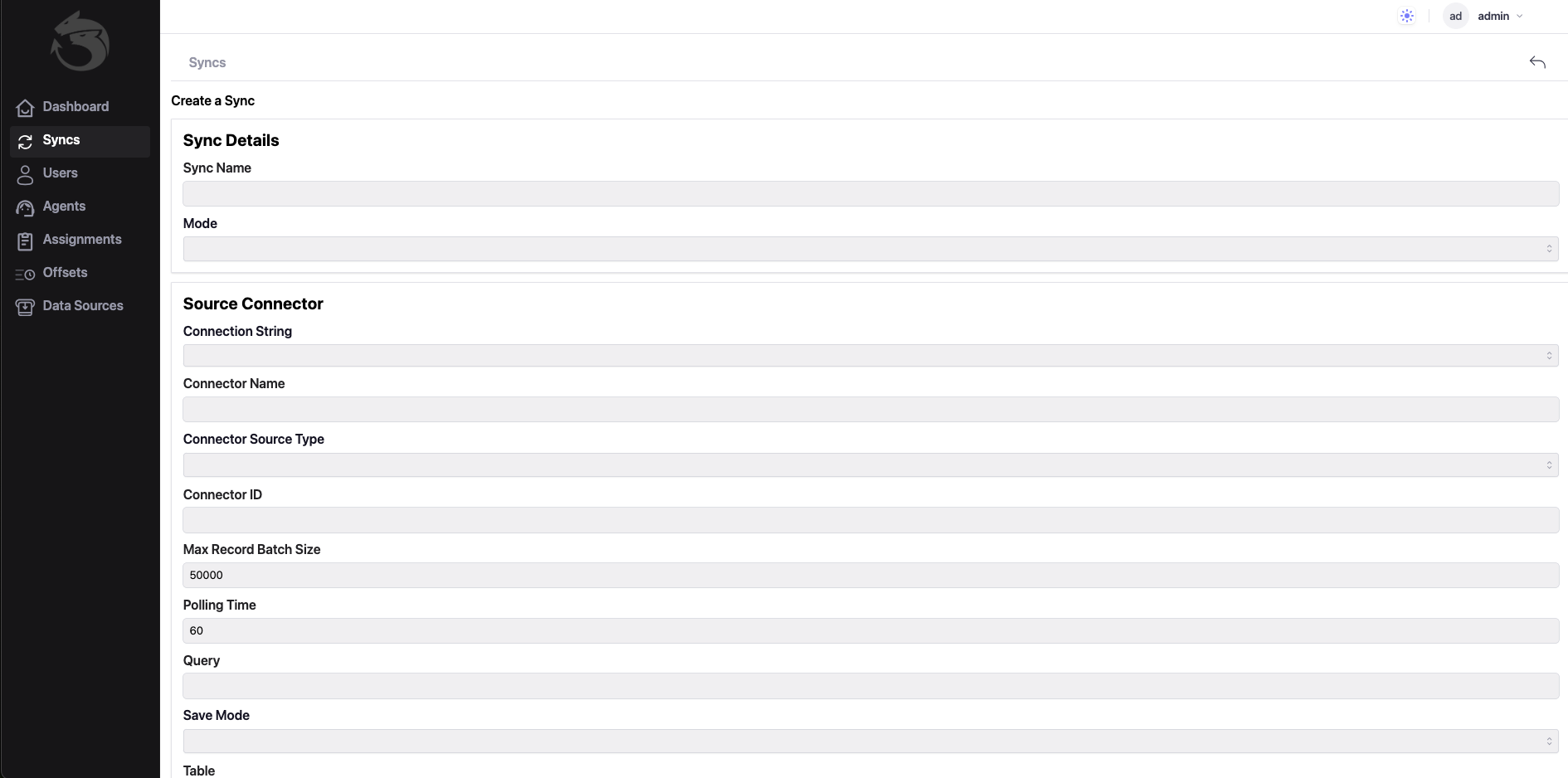
Connection Strings is: host=localhost user=postgres password=mimmo dbname=postgres port=5432 sslmode=disable TimeZone=Europe/Rome

Connection Strings is: root:@tcp(127.0.0.1:3306)/scuola?charset=utf8mb4&parseTime=True&loc=Local
2) (Postgres/MySql with ConnectorId)
9 - Contributing and support
About contributing and support
Understanding the Apache 2.0 License
License Overview: The Apache 2.0 license allows you to freely use, modify, and distribute the software, provided that you adhere to certain conditions, such as including a copy of the license in any distributed software and not using trademarks without permission.
Steps to Contribute
Explore the Project: Start by familiarizing yourself with the project. Review its documentation, read the code, and understand its purpose and structure.
Engage with the community through forums, chat channels, or mailing lists. This is a great way to ask questions, get feedback, and understand the project’s needs.
Identify Issues:
Look for issues labeled as “good first issue” or “help wanted” in the project’s issue tracker. These are typically tasks suitable for new contributors.
Fork the Repository:
If you want to make changes, fork the project’s repository on platforms like GitHub. This creates a personal copy of the project.
Make Your Changes:
Clone your forked repository to your local machine, make your changes, and test them thoroughly.
Document Your Work:
Good documentation is crucial. Make sure to update any relevant documentation that your changes affect.
Submit a Pull Request:
Once you’re satisfied with your changes, push them to your fork and submit a pull request to the original repository. Provide a clear description of what you’ve done and why.
Supporting the Project
Review Others’ Contributions: Participate in code reviews for other contributors’ pull requests. This helps improve the quality of the project and fosters collaboration.
Spread the Word: Help promote the project by sharing it on social media or writing blog posts. Increased visibility can attract more contributors and users.
Stay Informed: Keep up with updates to the project and its community. This can involve following discussion threads, participating in meetings, or subscribing to newsletters.
Respecting the License
Attribution: Always give appropriate credit to the original authors of the project and maintain the integrity of the license in any derivative works.
By following these steps, you can effectively contribute to and support an open-source project under the Apache 2.0 license, while being part of a collaborative community focused on innovation and improvement.
9.1 - Support
Help and supporting
If you need support please contact us…